Monitoring with MLflow
MLflow records metrics, hyperparameters, and artifacts produced during training so you can compare runs over time. BaseModel supports two integration paths — pick whichever fits your setup.
Logging Semantics
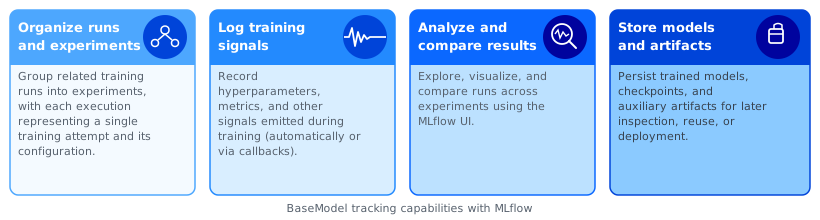
MLflow organizes data into a three-level hierarchy:
- Experiment — a named group of related runs (e.g.,
churn-binary-v2). Use one experiment per modeling objective so runs are easy to compare. - Run — a single training execution inside an experiment. Each run records its own parameters, metrics, and artifacts.
- Logged data inside a run:
| Kind | What it captures | Example |
|---|---|---|
| Parameters | Static values set before training | learning rate, epochs, seed |
| Metrics | Numeric values that change over time | train loss, val AUROC per epoch |
| Artifacts | Files produced during or after training | checkpoints, exported models, plots |
Both integration options below populate the same MLflow store — they differ only in how logging is triggered.
Option A — PyTorch Lightning Logger
Pass an MLFlowLogger instance to pretrain() or load_from_foundation_model(). Lightning handles metric logging automatically each epoch.
from pathlib import Path
from pytorch_lightning.loggers import MLFlowLogger
from monad.ui import pretrain

mlf_logger = MLFlowLogger(
    tracking_uri="sqlite:////path/to/mlflow/storage/mlflow.db",
    experiment_name="basemodel-experiment",
    run_name="fm-pretrain-v1",
)

pretrain(
    config_path=Path("./fm_config.yaml"),
    output_path=Path("./fm_output"),
    pl_logger=mlf_logger,
)
from pytorch_lightning.loggers import MLFlowLogger
from monad.ui.config import TrainingParams
from monad.ui.module import BinaryClassificationTask, load_from_foundation_model

mlf_logger = MLFlowLogger(
    tracking_uri="sqlite:////path/to/mlflow/storage/mlflow.db",
    experiment_name="basemodel-experiment",
    run_name="sc-churn-v1",
)

def target_fn(history, future, entity, ctx):
    ...
    return target

trainer = load_from_foundation_model(
    checkpoint_path="/path/to/fm",
    downstream_task=BinaryClassificationTask(),
    target_fn=target_fn,
    pl_logger=mlf_logger,
)

training_params = TrainingParams(
    ...
)

trainer.fit(training_params=training_params)
Option B — Native MLflow
Use mlflow.pytorch.autolog() to capture training signals without an explicit logger object. This gives you finer control over what gets logged and when.
from pathlib import Path
import mlflow
import mlflow.pytorch
from monad.ui import pretrain

mlflow.set_tracking_uri("sqlite:////path/to/mlflow/storage/mlflow.db")
mlflow.set_experiment("basemodel-experiment")

mlflow.pytorch.autolog(log_models=True)

with mlflow.start_run(run_name="fm-pretrain"):
    pretrain(
        config_path=Path("./fm_config.yaml"),
        output_path=Path("./fm_output"),
    )
from pathlib import Path
import mlflow
import mlflow.pytorch
from monad.ui.config import TrainingParams
from monad.ui.module import BinaryClassificationTask, load_from_foundation_model

def target_fn(history, future, entity, ctx):
    ...
    return target

trainer = load_from_foundation_model(
    checkpoint_path=Path("/path/to/fm"),
    downstream_task=BinaryClassificationTask(),
    target_fn=target_fn,
)

training_params = TrainingParams(
    ...
)

mlflow.set_tracking_uri("sqlite:////path/to/mlflow/storage/mlflow.db")
mlflow.set_experiment("churn-binary-classification")

mlflow.pytorch.autolog(
    log_models=True,
    log_every_n_epoch=1,
    log_every_n_step=10,
)

with mlflow.start_run() as run:

    # (Optional) Log static parameters
    mlflow.log_param("learning_rate", training_params.learning_rate)
    mlflow.log_param("epochs", training_params.epochs)
    mlflow.log_param("devices", ",".join(map(str, training_params.devices)))
    mlflow.log_param("checkpoint_dir", str(training_params.checkpoint_dir))
    mlflow.log_param("seed", 42)

    # Run training
    result = trainer.fit(
        training_params=training_params,
        overwrite=True,
        seed=42,
    )

    # Log metrics returned by trainer (if any)
    if isinstance(result, dict):
        for k, v in result.items():
            try:
                mlflow.log_metric(k, float(v))
            except (TypeError, ValueError):
                pass

    # Log underlying PyTorch model if exposed
    model = getattr(trainer, "model", None) or getattr(
        trainer, "network", None
    )
    if model is not None:
        mlflow.pytorch.log_model(model, artifact_path="model")

    # Log all checkpoints as artifacts
    try:
        mlflow.log_artifacts(
            str(training_params.checkpoint_dir),
            artifact_path="checkpoints",
        )
    except Exception as e:
        print(f"Warning: failed to log checkpoints: {e}")
Viewing Results
Start the MLflow UI and open it in a browser (defaults to localhost:5000):
From the UI you can browse experiments, compare runs side-by-side, and download stored artifacts.