Target Function
The target function is a Python function you write that defines what your model learns to predict. It bridges your business question and the model's training objective.
How It Works
During training, BaseModel samples random split points across each entity's timeline:
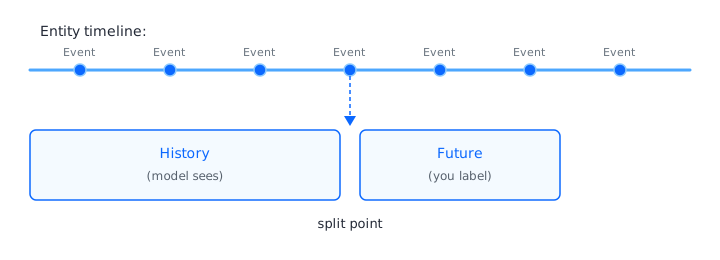
Your target function receives both sides and computes a label from future. The model only ever sees history — it learns patterns that correlate with the label you return. At inference time there is no future; the model predicts what your function would have returned.
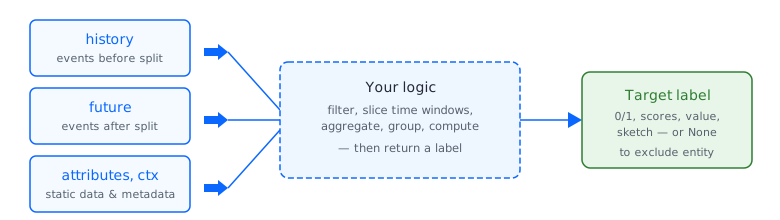
In practice, the logic is intuitive:
- Churn — look at future events, count them, and if a given entity has none, flag it as
1(churned). - Favorite brand — calculate each brand's share of future purchases and return the highest as the predicted favorite.
- Next-30-day spend — sum up transaction amounts in the next 30 days and return the total.
Function Signature
def target_fn(
    history: Events,      # events before the split — what the model sees
    future: Events,       # events after the split — compute your label from this
    attributes: Attributes,  # static entity attributes
    ctx: dict             # context: SPLIT_TIMESTAMP, MODE, etc.
):
    ...
    return value  # or None to exclude this entity
The return type depends on the task:
| Task | Return (or None to skip) |
|---|---|
| Binary Classification | A single-element array — 0 or 1.np.array([1 if churned else 0], dtype=np.float32) |
| Multi-Class Classification | An array of normalized scores, with shape=(num_classes,), summing to 1.np.array(scores, dtype=np.float32) |
| Multilabel Classification | An array of independent 0/1 flags, with shape=(num_labels,).np.array([1, 0, 1], dtype=np.float32) |
| Regression | An array of continuous values, with shape=(num_targets,).np.array([total_spend], dtype=np.float32) |
| Recommendation | A Sketch object built from item IDs and weights.sketch(items, weights) |
Return None to exclude an entity from training — use this for cold-start users, test accounts, or incomplete time windows.
Accessing Data
Events
history and future are keyed by data source name. Each source exposes columns, timestamps, and aggregation methods.
txns = future["transactions"]       # DataSourceEvents

txns.count()                         # event count (see Aggregations)
txns.timestamps                      # np.ndarray of unix timestamps

txns["product_id"].events            # np.ndarray of column values
txns["price"].events                 # np.ndarray of column values
Attributes
Main entity attributes are passed as the attributes parameter. Access a column with .attribute (returns a string):
Columns from joined attribute data sources are accessed on events via get_qualified_column_name:
from monad.ui.target_function import get_qualified_column_name

category_col = get_qualified_column_name("category_name", data_sources_path=["products"])
txns[category_col].events   # np.ndarray of values
Context
from monad.ui.target_function import SPLIT_TIMESTAMP

split_time = ctx[SPLIT_TIMESTAMP]   # unix timestamp of the split
The context surfaces SPLIT_TIMESTAMP, which you need for defining intervals such as interval_from or interval_between.
Extra Columns
Extra columns are loaded from your data but not used as model features. They are available only inside the target function — useful for order IDs, flags, or metadata needed to compute labels.
Pre-declare extra columns in config
Extra columns must be declared in data_params.extra_columns in your foundation model YAML before they can be used here. See Select & Organize → Extra Columns for the YAML configuration.
Access them inside the target function via .extra:
# On events — via .extra
order_ids = future["transactions"].extra["order_id"]       # np.ndarray
prices = future["transactions"].extra["unit_price"]        # np.ndarray

# On attributes — via .extra
is_test = attributes["customers"].extra["is_test_account"]
Extra columns are only available in the target function
Unlike regular columns, which are available in model training, the target function, and at inference, extra columns are only present inside the target function. Use them for label computation, but never for eligibility checks or filtering that you expect to work at inference time.
Only add extra columns you actually need.
Time Windows
Slicing to a Window
Most target functions should scope future (and sometimes history) to a specific window rather than using everything.
from datetime import timedelta

# Next 30 days after split
future_30d = future.interval_from(ctx[SPLIT_TIMESTAMP], timedelta(days=30))

# Last 90 days before split (negative timedelta = look back)
recent = history.interval_from(ctx[SPLIT_TIMESTAMP], timedelta(days=-90))

# Explicit range
window = history.interval_between(
    start=ctx[SPLIT_TIMESTAMP] - 30 * 86400,
    end=ctx[SPLIT_TIMESTAMP],
    include="start"
)

# Most recent basket (events sharing the last timestamp)
last_basket = history["transactions"].get_last_basket()
Checking Window Completeness
Near the end of your data a 30-day future window might contain only a few days, producing unreliable labels. Guard against this:
from monad.ui.target_function import has_incomplete_training_window

def target_fn(history, future, attributes, ctx):
    if has_incomplete_training_window(ctx, timedelta(days=30)):
        return None

    future_30d = future.interval_from(ctx[SPLIT_TIMESTAMP], timedelta(days=30))
    return np.array([future_30d["transactions"].sum("price")], dtype=np.float32)
Filtering
# By column value
app_txns = txns.filter("channel", lambda x: x == "APP")
expensive = txns.filter("price", lambda x: x > 100)

# Shorthand for equality
app_txns = txns.where_eq("channel", "APP")
multi = txns.where_eq("channel", ["APP", "WEB"])

# By computed expression
high_value = txns.filter(
    lambda data: data["price"] * data["quantity"],
    lambda x: x > 500
)
Aggregations
All aggregations operate on DataSourceEvents objects. For the full API, see the Target Function Reference.
Basic Aggregations
| Method | Description | Example |
|---|---|---|
.count() |
Number of events | txns.count() |
.sum(col) |
Sum of column values | txns.sum("price") |
.mean(col) |
Mean | txns.mean("price") |
.min(col) |
Minimum | txns.min("price") |
.max(col) |
Maximum | txns.max("price") |
Columns can be passed as a string or as a lambda for computed values:
GroupBy Aggregations
All groupBy operations return a tuple (values, group_names) — always unpack both.
counts, names = txns.groupBy("category").count()
counts, names = txns.groupBy("category").count(normalize=True)  # proportions
sums, names   = txns.groupBy("category").sum("price")

# Fix ordering with explicit groups
counts, names = txns.groupBy("category").count(
    groups=["Electronics", "Fashion", "Home"]
)

# Check existence
exists, names = txns.groupBy("brand").exists(groups=["Sony", "Apple"])
Extra columns (accessed via .extra) support the same groupBy operations as regular columns:
extra = future["transactions"].extra
totals, order_ids = extra.groupBy("order_id").sum(target="unit_price")
Sketches (Recommendations)
Recommendation targets return a Sketch — a weighted set of items.
from monad.ui.target_function import sketch, sequential_decay

items = future["transactions"]["product_id"]   # ModalityEvents
weights = sequential_decay(future["transactions"], gamma=0.5)
return sketch(items, weights)
Two decay functions are available to control the importance of events over time:
sequential_decay(events, gamma, init_weights=None)— weight by position in the sequence.gamma=0keeps only the first basket (next-basket prediction);gamma=1weights all items equally (no decay). Values in between apply gradual sequential decay.time_decay(events, daily_decay, init_weights=None)— weight by elapsed time from the first event.daily_decay=0.1means weights drop to 10% of their initial value after one day.
For common mistakes, debugging advice, and performance tips, see Validation & Best Practices.