Inference
Generate predictions on new data by loading a trained scenario checkpoint and calling predict().
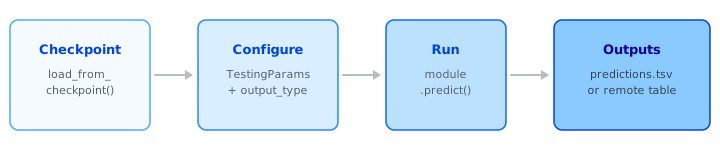
Load the checkpoint, configure an output type, call predict(), and collect the results. The sections below walk through each step; a complete runnable script is at the bottom of the page.
Inference vs Evaluation
Inference vs evaluation
Evaluation (test()) compares predictions against ground truth and reports metrics. Inference (predict()) scores new data for production use — there is no ground truth and no metrics are computed. Both methods accept TestingParams and produce a predictions file; the difference is the intent.
Loading for Inference
Point load_from_checkpoint() at the checkpoint directory saved during training:
from pathlib import Path
from monad.ui.module import load_from_checkpoint

module = load_from_checkpoint(checkpoint_path=Path("./my_scenario_model"))
Set prediction_date in TestingParams to define the temporal cutoff — only entities with data before this date are scored. For additional loading options (split overrides, prediction filtering), see Loading Overrides.
Choosing an Output Type
The output_type parameter in TestingParams controls how predictions are formatted:
| Task | DECODED |
SEMANTIC |
|---|---|---|
| Binary | Probabilities | 0 or 1 |
| Multiclass | Probabilities | Class names |
| Multilabel | Probabilities | Class names (requires top_k) |
| Regression | Human-readable values | Human-readable values |
| Recommendation | Probabilities per item | Item IDs / names |
Which output type to use
DECODED— downstream analysis, model comparison, and integration pipelinesSEMANTIC— human-readable resultsRAW_MODELandENCODED— advanced use cases
See Reference: Testing Parameters for the full output-type matrix.
Recommendation Scores
For recommendation models, you can generate compact encoded predictions and decode them later using two utility functions. This is useful when you want to store predictions efficiently and look up scores for specific items on demand.
Step 1 — Generate encoded predictions:
from monad.ui.config import OutputType, TestingParams

testing_params = TestingParams(
    output_type=OutputType.ENCODED,
    local_save_location=Path("./encoded_predictions.tsv"),
    prediction_date=prediction_date,
)

module.predict(testing_params=testing_params)
Step 2 — Decode with readout_sketch() and read_target_entity_ids():
from monad.ui.module import readout_sketch, read_target_entity_ids

# Map target entity IDs (e.g., product IDs) to score indices
target_to_index = read_target_entity_ids(checkpoint_path="./reco_model")

# Decode predictions into per-entity score arrays
for entity_id, scores in readout_sketch(
    predictions_file="./encoded_predictions.tsv",
    checkpoint_path="./reco_model",
):
    # scores is a numpy array — look up a specific item
    item_score = scores[target_to_index["product_001"]]
    print(f"Entity {entity_id}: product_001 score = {item_score}")
For full API details on these functions, see Reference: Testing Parameters — Prediction Utilities.
From the Command Line
You can also score new data without writing any Python, using the --predict stage of monad.run. It loads a trained checkpoint and a TestingParams YAML, then writes predictions to the configured location:
output_type: decoded
prediction_date: "2026-01-01"
local_save_location: ./predictions.tsv
python -m monad.run \
  --predict \
  --checkpoint-path "./my_scenario_model" \
  --testing-params-path "./testing_params.yaml"
The stage runs on a single GPU. To write to a database instead of a local TSV, set remote_save_location in the YAML (Snowflake or Databricks). See Training Execution for the full flag list.
Example
Complete prediction script from the onboarding package — adapt the paths, prediction date, and output type to your scenario:
from datetime import datetime
from pathlib import Path

from monad.ui.config import OutputType, TestingParams
from monad.ui.module import load_from_checkpoint


# --- Names & Paths -----------------------------------------------------------

# EDIT: provide path to scenario checkpoints directory saved during training
scenario_checkpoint_dir = Path("/basemodel/projects/project_dir/scenarios/scenario_name").resolve()

# EDIT: define where prediction outputs will be saved
predictions_path = scenario_checkpoint_dir / "predictions" / "predictions.tsv"


# --- Prediction Set Definition -----------------------------------------------

# EDIT: prediction_date defines the split point used for inference
prediction_date = datetime(2020, 9, 23)


# --- Predict -----------------------------------------------------------------

prediction_module = load_from_checkpoint(checkpoint_path=scenario_checkpoint_dir)

testing_params = TestingParams(
    output_type=OutputType.DECODED,
    local_save_location=predictions_path,
    prediction_date=prediction_date,
)

prediction_module.predict(testing_params=testing_params)
This script is part of the onboarding package shipped with every BaseModel installation. Equivalent scripts exist for all task types (multiclass, multilabel, regression, recommendation).
Related Resources
| Resource | Description |
|---|---|
| Reference: Testing Parameters | Full TestingParams field reference, OutputType matrix, and prediction utilities |
| Evaluation | Evaluate a trained model against ground truth with metrics |
| Loading Overrides | Filter predictions, override splits, and customize checkpoint loading |
| Recipes | End-to-end recipes with prediction scripts for all task types |