Interface Overview: Inferences in BaseModel
The Inferences interface in BaseModel allows users to monitor and manage inference runs, track outputs, and review upstream dependencies. This section provides an organized view of all inference results, their statuses, and execution details.
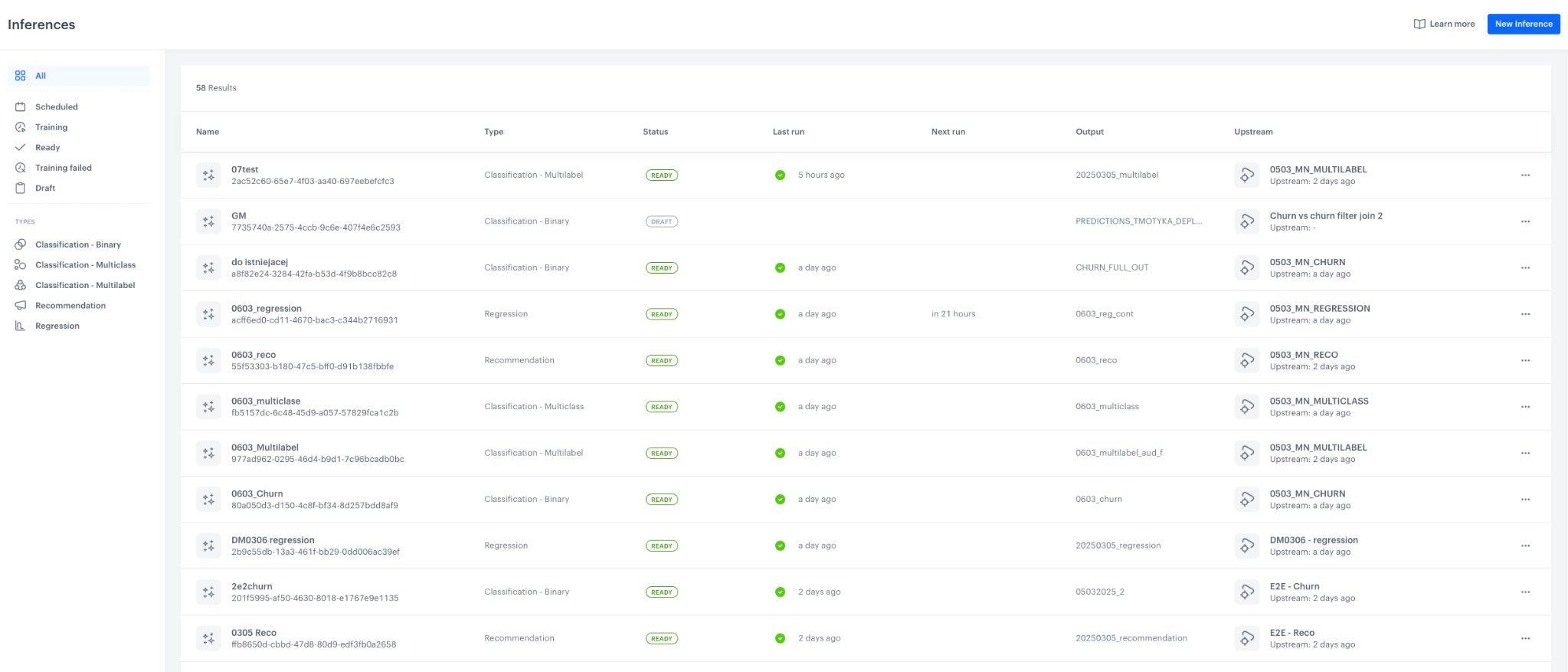
1. Navigation Panel (Left Sidebar)
Purpose:
The left sidebar provides filtering options to help users locate and organize inference runs.
Filter by Status:
| Status | Description |
|---|---|
| Scheduled | Inferences that are planned for execution. |
| Scoring | Inferences currently being processed. |
| Ready | Inferences that have been successfully completed. |
| Scoring Failed | Inferences where execution encountered errors. |
| Draft | Inferences that are still in setup mode. |
Filter by Type:
| Type |
|---|
| Classification - Binary |
| Classification - Multiclass |
| Classification - Multilabel |
| Recommendation |
| Regression |
2. Inferences List (Main Content Area)
Purpose:
Displays a list of all inference runs, showing key details about each.
Key Components:
| Column | Description |
|---|---|
| Name | The name or identifier of the inference run. |
| Type | The model type used for inference (e.g., Classification - Binary, Regression, Recommendation). |
| Status | The current state of the inference (e.g., "READY", "DRAFT"). |
| Last Run | The time when the inference was last executed. |
| Next Run | The next scheduled execution time, if applicable. |
| Output | The name of the output file or dataset generated by the inference. |
| Upstream | Indicates the source model or dataset used to generate the inference. |
Additional Features:
- Search and Filter Results: Displays the total number of results (e.g., "58 Results"), which updates based on applied filters.
- Inference Actions (Three Dots Menu): Each inference entry includes an options menu where users can perform actions like viewing details, duplicating, or deleting.