Evaluation
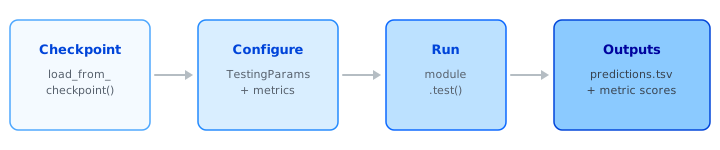
Evaluate a trained scenario model on the held-out test set and export predictions alongside ground truth. You need to:
- load the checkpoint that training saved,
- tell BaseModel what output format and metrics you want,
- call
test(), and collect the results.
The sections below walk through each step; a complete runnable script is at the bottom of the page.
Loading the Checkpoint
Point load_from_checkpoint() at the checkpoint directory you passed as checkpoint_dir during training:
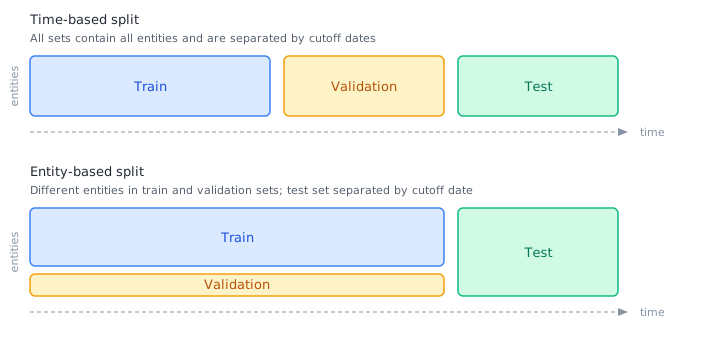
The test set is determined by the split configured during training:
- Time-based split (default) — entities whose data falls after the split timestamp form the test set. Set
prediction_dateinTestingParamsto define the cutoff. - Entity-based split — a fixed set of entities is held out regardless of time.
For additional loading options (split overrides, prediction filtering), see Loading Overrides.
Choosing an Output Type
The output_type parameter controls how predictions are formatted. DECODED is the right choice for most evaluation workflows (except recommendations, which use SEMANTIC):
| Task | DECODED |
SEMANTIC |
|---|---|---|
| Binary | Probabilities | 0 or 1 |
| Multiclass | Probabilities | Class names |
| Multilabel | Probabilities | Class names (requires top_k) |
| Regression | Human-readable values | Human-readable values |
| Recommendation | Probabilities per item | Item IDs / names |
Which output type to use
DECODED— downstream analysis, model comparison, and integration pipelinesSEMANTIC— human-readable resultsRAW_MODELandENCODED— advanced use cases
See Reference: Testing Parameters for the full output-type matrix.
Adding Metrics
Pass MetricParams to compute evaluation metrics during testing. The alias is the name that appears in logs; metric_name resolves against BaseModel's built-in set or TorchMetrics:
metrics = [
    MetricParams(alias="auroc", metric_name="AUROC", kwargs={"task": "binary"}),
    MetricParams(alias="recall", metric_name="Recall", kwargs={"task": "binary"}),
]

testing_params = TestingParams(
    output_type=OutputType.DECODED,
    metrics=metrics,
    ...
)
Each task type already ships with sensible default metrics (listed on the model configuration pages). You only need to specify metrics explicitly when you want to add or replace them.
For advanced use cases — custom TorchMetrics instances, metric monitoring during training, per-class breakdown — see Custom Metrics.
Smoke Testing
Smoke-test before a full evaluation
Before running a full evaluation, verify the pipeline works with a small number of batches:
Remove limit_test_batches when you are ready for a full run.
Example
Complete testing script from the onboarding package — adapt the paths, prediction date, and metrics to your scenario:
from datetime import datetime
from pathlib import Path

from monad.ui.config import MetricParams, OutputType, TestingParams
from monad.ui.module import load_from_checkpoint


# --- Names & Paths -----------------------------------------------------------

# EDIT: provide path to scenario checkpoints directory saved during training
scenario_checkpoint_dir = Path("/basemodel/projects/project_dir/scenarios/scenario_name").resolve()

# EDIT: if desired, modify where test outputs will be saved
predictions_path = scenario_checkpoint_dir / "test" / "predictions_and_ground_truth.tsv"


# --- Test Set Definition -----------------------------------------------------

# EDIT: prediction_date defines the start of the temporally defined test set
prediction_date = datetime(2020, 9, 5)

# EDIT: limited runs - use for smoke test, else comment out
limit_test_batches = 100


# --- Metrics -----------------------------------------------------------------

# EDIT: define metrics to compute during testing
metrics = [
    MetricParams(alias="auroc", metric_name="AUROC", kwargs={"task": "binary"}),
    MetricParams(alias="recall", metric_name="Recall", kwargs={"task": "binary"}),
    MetricParams(alias="precision", metric_name="Precision", kwargs={"task": "binary"}),
]

# For more options refer to docs.
# Testing parameters: https://docs.basemodel.ai/reference/testingparams
# Testing metrics: https://docs.basemodel.ai/docs/customizing-testing-metrics


# --- Test --------------------------------------------------------------------

testing_module = load_from_checkpoint(checkpoint_path=scenario_checkpoint_dir)

testing_params = TestingParams(
    output_type=OutputType.DECODED,
    local_save_location=predictions_path,
    prediction_date=prediction_date,
    metrics=metrics,
    limit_test_batches=limit_test_batches,  # smoke test, comment out for full runs
)

testing_module.test(testing_params=testing_params)
This script is part of the onboarding package shipped with every BaseModel installation. Equivalent scripts exist for all task types (multiclass, multilabel, regression, recommendation).
Related Resources
| Resource | Description |
|---|---|
| Reference: Testing Parameters | Full TestingParams field reference and OutputType details |
| Custom Metrics | Add, replace, or customize evaluation metrics |
| Inference | Generate predictions for production use (beyond evaluation) |
| Recipes | End-to-end recipes for all task types |