Tasks & Targets
Every scenario requires two things: a task that defines the type of prediction, and a target function that tells the model what to learn. Together they turn the foundation model's general understanding into a focused business prediction.
Choosing a Task
The task determines the shape of the model's output. Use the flowchart to find the right task type, then check the comparison table for details.
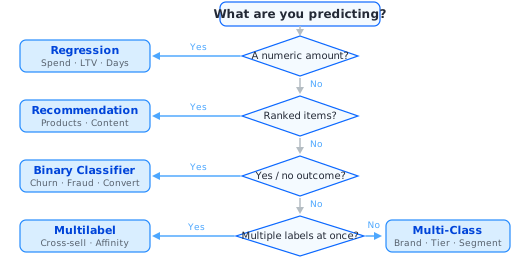
Task type comparison
| Task Type | Details |
|---|---|
| Binary Classifier | Class: BinaryClassificationTaskQuestion: Will something happen — yes or no? Example: Churn, fraud, conversion Target return: [0] or [1]Output: Probability Default metric: AUROC |
| Multi-Class Classifier | Class: MulticlassClassificationTaskQuestion: Which one of several categories? Example: Favorite brand, plan tier, segment Target return: Normalized scores (sum to 1) Output: Softmax probabilities Default metric: MultipleTargetsRecall Required param: class_names |
| Multilabel Classifier | Class: MultilabelClassificationTaskQuestion: Which combination of labels? Example: Cross-sell departments, category affinity Target return: Independent 0/1 flags Output: Sigmoid probabilities Default metric: AUROC Required param: class_names |
| Regression | Class: RegressionTaskQuestion: How much? A numeric value. Example: 90-day spend, LTV, days to next visit Target return: Continuous float(s) Output: Predicted value(s) Default metric: RMSE |
| Recommendation | Class: RecommendationTaskQuestion: Which items should be suggested? Example: Next product to buy, content picks Target return: Sketch (weighted item set) Output: Ranked item list Default metric: HitRate@K |
For detailed configuration of each task type, see Model Configuration.
Writing a Target Function
The target function is a Python function you write that defines what the model learns to predict. It receives an entity's history, future, attributes, and context, and returns a label matching the task type. See Target Function for the full API.
def churn_target(history: Events, future: Events, entity: Attributes, ctx: dict):
    target_window = timedelta(days=30)
    if has_incomplete_training_window(ctx, target_window):
        return None  # skip entities without enough data

    future = future.interval_from(ctx[SPLIT_TIMESTAMP], target_window)
    return np.array([1 if future["transactions"].count() == 0 else 0],
                    dtype=np.float32)
In This Section
| Guide | Description |
|---|---|
| Target Function | Inputs, time windows, operations on events, and output format in detail |
| Target Examples | Ready-made examples for each task type |
| Validation & Best Practices | Validate with verify_target(), common mistakes, and performance tips |
Once task and target are defined, move on to Model Configuration to set up and run training.