
Target Function: Operations on Events
The input transformations allowed in functions
Check This First!This article refers to BaseModel accessed via Docker container. Please refer to Snowflake Native App section if you are using BaseModel as SF GUI application.
Target functions transform events (history, future), and attributes into a label (or labels) for supervised learning suitable for a given business scenario.
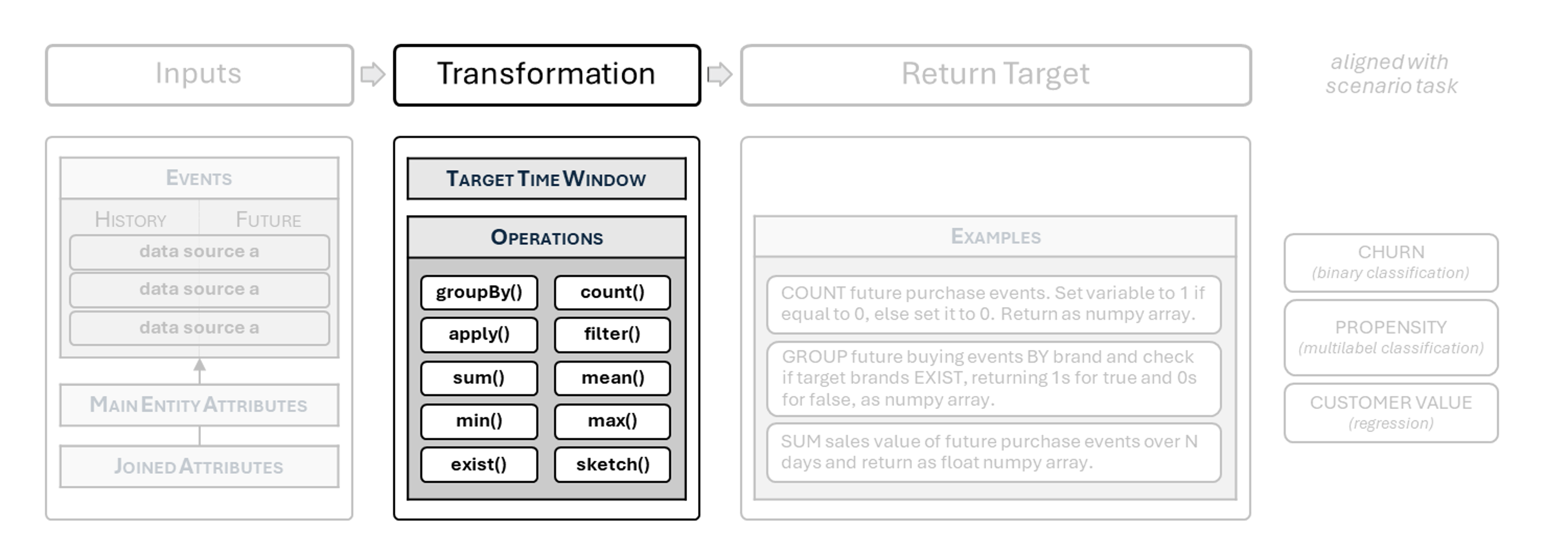
You can build the following types of targets in BaseModel:
| target type & use cases | expected label shape & notes |
|---|---|
| binary — churn, conversion, fraud | single binary value (0/1), usually returned as a length-1 array (e.g. np.array([label], dtype=np.float32)) |
| multilabel — category / brand propensity | vector of binary indicators (0/1), one per label in a fixed list; multiple 1s allowed |
| multiclass — next category, dominant segment | vector representing exactly one class; typically a one-hot vector or a normalized probability distribution (sums to 1) |
| regression — spend, margin, frequency | single float value, typically returned as a length-1 array |
| recommendation — next item, next basket | sketch-based label derived from events rather than an explicit numeric vector |
Operations On Events
The following operations can be implemented directly on event objects, both history and future.
count()
Calculates the number of events.
Signature
count() -> int
Example
churn = 0 if future["purchases"].count() > 0 else 1
sum()
Sums values from a column or a computed expression.
Signature
sum(column: str | Callable[[Mapping[str, np.ndarray]], np.ndarray], ignore_nan: bool = True) -> float
Examples
# sum of a column
total_spend = future["transactions"].sum(column="purchase_value")

# sum of a computed expression (price * quantity)
total_spend = future["transactions"].sum(
    column=lambda data: data["price"] * data["quantity"],
)
mean()
Computes the mean from a column or a computed expression.
Signature
mean(column: str | Callable[[Mapping[str, np.ndarray]], np.ndarray], ignore_nan: bool = True) -> float
Examples
# mean of a column
avg_price = future["transactions"].mean(column="price")

# mean of a computed expression (price * quantity)
avg_line_value = future["transactions"].mean(
    column=lambda data: data["price"] * data["quantity"],
)
min()
Returns the minimum from a column or a computed expression.
Signature
min(column: str | Callable[[Mapping[str, np.ndarray]], np.ndarray], ignore_nan: bool = True) -> float
Example
min_line_value = future["transactions"].min(
    column=lambda data: data["price"] * data["quantity"],
)
max()
Returns the maximum from a column or a computed expression.
Signature
max(column: str | Callable[[Mapping[str, np.ndarray]], np.ndarray], ignore_nan: bool = True) -> float
Example
max_line_value = future["transactions"].max(
    column=lambda data: data["price"] * data["quantity"],
)
apply()
Applies a function element-wise to a target column.
Signature
apply(func: Callable[[Any], Any], target: str) -> DataSourceEvents
Example
normalized = future["product_buy"].apply(
    func=lambda x: x.lower(),
    target="brand",
)
filter()
Filters events using either:
- a column name (
str), or - a callable expression producing an array aligned with events.
Signature
filter(by: str | Callable[[Mapping[str, np.ndarray]], np.ndarray], condition: Callable[[Any], bool]) -> DataSourceEvents
Examples
# filter using a column name
promo_only = future["transactions"].filter(
    by="campaign_id",
    condition=lambda x: x in campaigns_in_scope,
)

# filter using a computed expression (price * quantity)
large_lines = future["transactions"].filter(
    by=lambda data: data["price"] * data["quantity"],
    condition=lambda x: x >= 100.0,
)
groupBy()
Groups events by one or more columns and returns an EventsGroupBy proxy.
Signature
groupBy(by: str | list[str]) -> EventsGroupBy
Note
groupByonly produces output when followed by a grouped operation (e.g.count,sum,exists, ...).
A full list of supported operations, along with examples, is provided in the subsection below.
Example
present, brands = (
    future["product_buy"]
    .groupBy("brand")
    .exists(groups=["Nike", "Adidas"])
)Note
All aggregations (
sum,mean,min,max) ignoreNaNvalues by default (ignore_nan=True).
Operations On Grouped Events
Grouped operations are applied to the result of groupBy(...) (an EventsGroupBy object).
count()
Counts elements in each group.
Signature
count(normalize: bool = False, groups: list[Any] | None = None) -> tuple[np.ndarray, list[str]]
Example
counts, brands = (
    future["purchases"]
    .groupBy("brand")
    .count(normalize=True, groups=["Garmin", "Suunto"])
)
sum()
Sums a column or a computed expression within each group.
Signature
sum(target: str | Callable[[Mapping[str, np.ndarray]], np.ndarray], groups: list[Any] | None = None, ignore_nan: bool = True) -> tuple[np.ndarray, list[str]]
Examples
# sum of a column per category
spend_by_cat, categories = (
    future["transactions"]
    .groupBy("category")
    .sum(target="purchase_value")
)

# sum of computed expression per category
spend_by_cat, categories = (
    future["transactions"]
    .groupBy("category")
    .sum(target=lambda data: data["price"] * data["quantity"])
)
mean()
Computes the mean of a column or a computed expression within each group.
Signature
mean(target: str | Callable[[Mapping[str, np.ndarray]], np.ndarray], groups: list[Any] | None = None, ignore_nan: bool = True) -> tuple[np.ndarray, list[str]]
Example
avg_line_value_by_brand, brands = (
    future["transactions"]
    .groupBy("brand")
    .mean(target=lambda data: data["price"] * data["quantity"])
)
min()
Computes the minimum of a column or a computed expression within each group.
Signature
min(target: str | Callable[[Mapping[str, np.ndarray]], np.ndarray], groups: list[Any] | None = None, ignore_nan: bool = True) -> tuple[np.ndarray, list[str]]
Example
min_line_value_by_cat, categories = (
    future["transactions"]
    .groupBy("category")
    .min(target=lambda data: data["price"] * data["quantity"])
)
max()
Computes the maximum of a column or a computed expression within each group.
Signature
max(target: str | Callable[[Mapping[str, np.ndarray]], np.ndarray], groups: list[Any] | None = None, ignore_nan: bool = True) -> tuple[np.ndarray, list[str]]
Example
max_line_value_by_store, stores = (
    future["transactions"]
    .groupBy("store")
    .max(target=lambda data: data["price"] * data["quantity"])
)
exists()
Checks whether each provided group has any events.
Signature
exists(groups: list[Any]) -> tuple[np.ndarray, list[str]]
Example
present, target_brands = (
    future["transactions"]
    .groupBy("brand")
    .exists(groups=TARGET_BRANDS)
)
apply()
Applies a custom reducer to each group’s values.
Signature
apply(func: Callable[[np.ndarray], Any], default_value: Any, target: str | Callable[[Mapping[str, np.ndarray]], np.ndarray], groups: list[Any] | None = None) -> tuple[Any, list[str]]
Example
import numpy as np

max_line_value, brands = (
    future["transactions"]
    .groupBy("brand")
    .apply(
        func=lambda x: float(np.nanmax(x)),
        default_value=0.0,
        target=lambda data: data["price"] * data["quantity"],
        groups=["Garmin", "Suunto"],
    )
)Note
All grouped aggregations (
sum,mean,min,max) ignoreNaNvalues by default (ignore_nan=True).